Walkthrough — your first pack
This walks the whole path once: empty window → a Terran admiral of your own, flying a fleet you tuned, in a running game. Nothing here needs Mission Director.
Budget about fifteen minutes. Every step names the screen it happens on.
1. Name the pack
Section titled “1. Name the pack”Pack tab, The extension.
| Field | What to put |
|---|---|
| Pack id | lower-case letters, digits and underscores. This becomes the folder name inside the game, the name of the generated script, and the prefix every id in the pack must carry. |
| Display name | what the player sees in the extensions menu. |
| Author, Version, Description | the manifest. Version is a plain integer and must go up for the game to see an update. |
The pack id is the one decision you cannot take back. Once a save has seen an id, it is permanent, and two packs that pick the same one collide in a way nobody can repair afterwards. Your own name plus the pack is the usual answer — mlog4_frontier, not heroes. The checker warns on anything short.
Save the file now: Save as… writes a .ghpack.json. That file is your source; the exported extension is the build output, and you can throw it away and re-export at any time.
2. Borrow a fleet, then change it
Section titled “2. Borrow a fleet, then change it”Fleets tab.
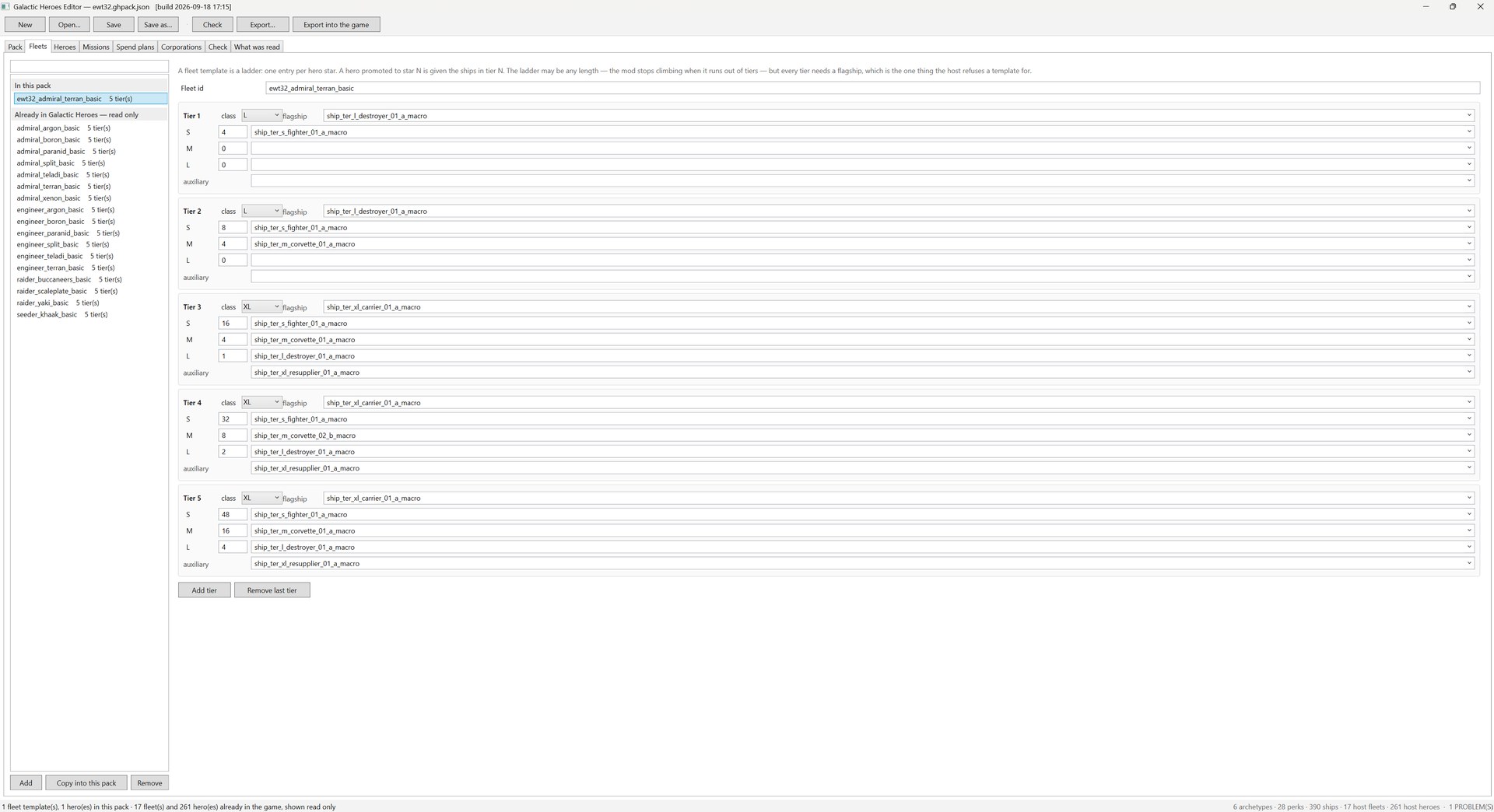
The list is always two groups: In this pack, which you can edit, and Already in Galactic Heroes — read only, which you cannot. The host’s own templates are shown beside yours deliberately. You cannot edit them — a change to a borrowed object would be silently thrown away, and the mod that owns it may reshape it in any later version — but you can read them, filter them, and copy them.
Select admiral_terran_basic in the read-only group and press Copy into this pack. You get an editable template under an id of your own, with your prefix applied and a collision counted past.
What a tier is
Section titled “What a tier is”A fleet template is a ladder: one entry per hero star. A hero promoted to ★N is given the ships in tier N. The ladder may be any length — the mod stops climbing when it runs out of tiers — but every tier needs a flagship, which is the one thing the host refuses a template for.
Each tier holds:
- class — the flagship’s size label (the host uses five values, and
Mis the commonest of all) - flagship — the macro the hero personally flies
- S / M / L — a count and a macro for each escort size
- auxiliary — one support ship, typically a resupplier from ★3 upward
Change what you like. A count of zero means “none”; an escort macro with a count of zero is flagged, because it is almost always a half-finished edit.
Every ship in the dropdowns came from your own install, so a ship a mod added is in the list like any other — and the exported manifest will declare that mod as an optional dependency automatically.
3. Write the hero
Section titled “3. Write the hero”Heroes tab. Press Add, or copy a host hero the same way you copied the fleet.
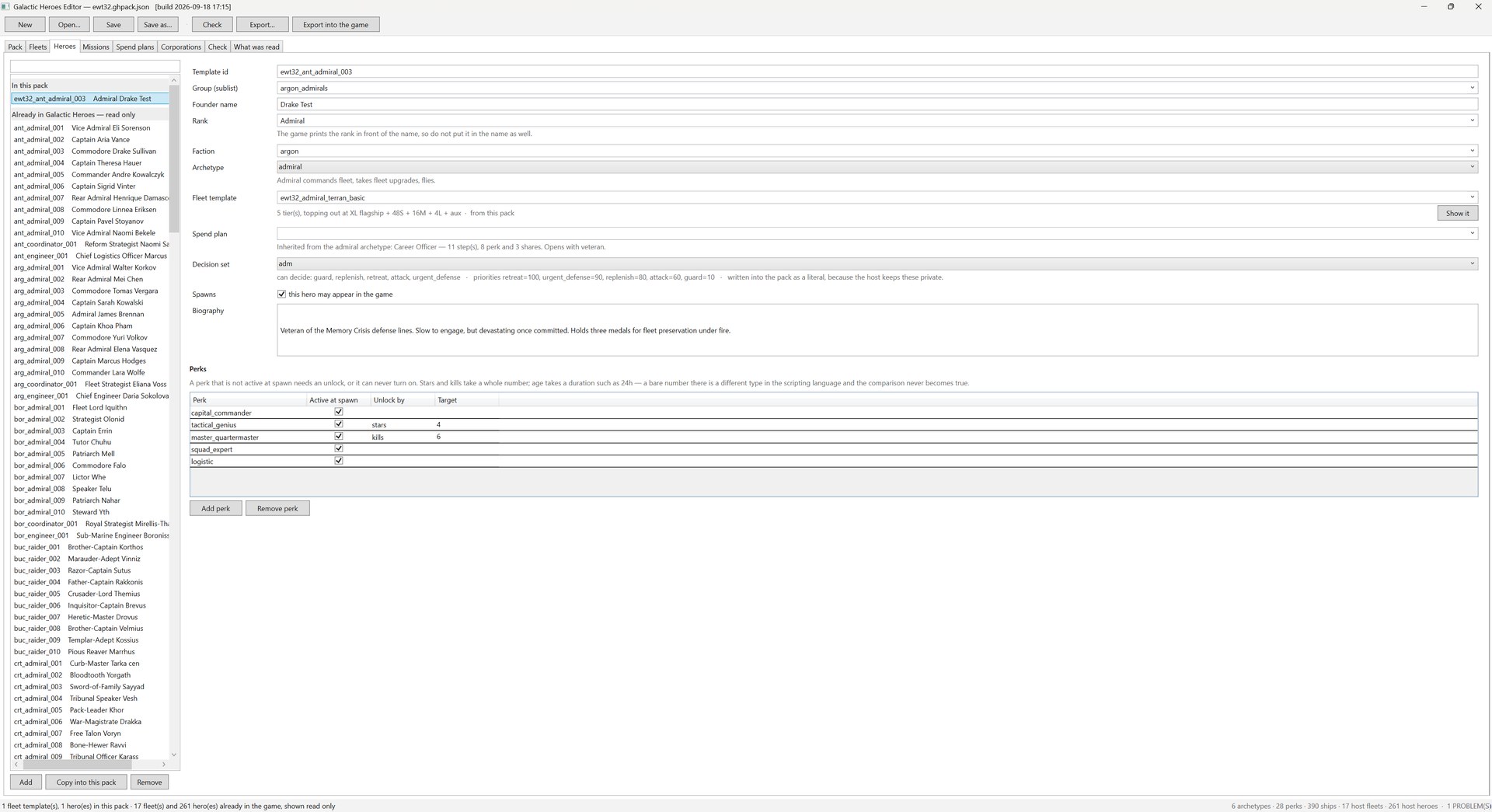
Field by field:
| Field | What it decides |
|---|---|
| Template id | permanent, must carry your pack prefix. |
| Group (sublist) | which roster bucket the hero belongs to — argon_admirals and so on. Joining a host group is perfectly ordinary. |
| Founder name | the name of the first hero off this template. Successors get their own. |
| Rank | the game prints the rank in front of the name, so do not put it in the name as well. The single commonest defect in the core roster is exactly that — 200 founders whose names repeat their own rank, so the game prints “Commodore Commodore Falo”. |
| Faction | any faction the game has. A faction with no claimspace tag has no territory, so the mod cannot resolve a home sector and the hero never spawns. |
| Archetype | one of six. It decides everything else — what the hero commands, whether it upgrades its fleet, whether it is station-bound. |
| Fleet template | yours or the host’s. The line underneath says what it actually is, and Show it jumps to that fleet. |
| Spend plan | optional. Leave it empty and the hero inherits its archetype’s default, named in the line below. |
| Decision set | which behaviours the hero offers, with priorities. Spelled out under the box, because the host keeps these private and the pack carries a copy. |
| Spawns | uncheck to keep a template in the pack without it appearing in game. |
| Biography | free text. An apostrophe would end an MD string literal and a quote would end an XML attribute — both are neutralised on export, so write normally. |
The grid below takes one row per perk, with three columns that matter:
- Active at spawn — the hero starts with it.
- Unlock by —
stars,killsorage, if the perk should turn on later. - Target — the number to reach. Stars and kills take a whole number; age takes a duration such as
24h, because a bare number is a different type in the scripting language and the comparison never becomes true.
A perk that is neither active at spawn nor given an unlock can never turn on, and the checker says so. A perk that is both is flagged too — the unlock is dead weight.
A perk whose applies_to list does not include this hero’s archetype is a warning, not an error: nothing breaks, nothing reads its effects either. The core roster contains 16 of them.
4. Spend plans (optional)
Section titled “4. Spend plans (optional)”Spend plans tab. A plan is what a hero buys with its money, in order.
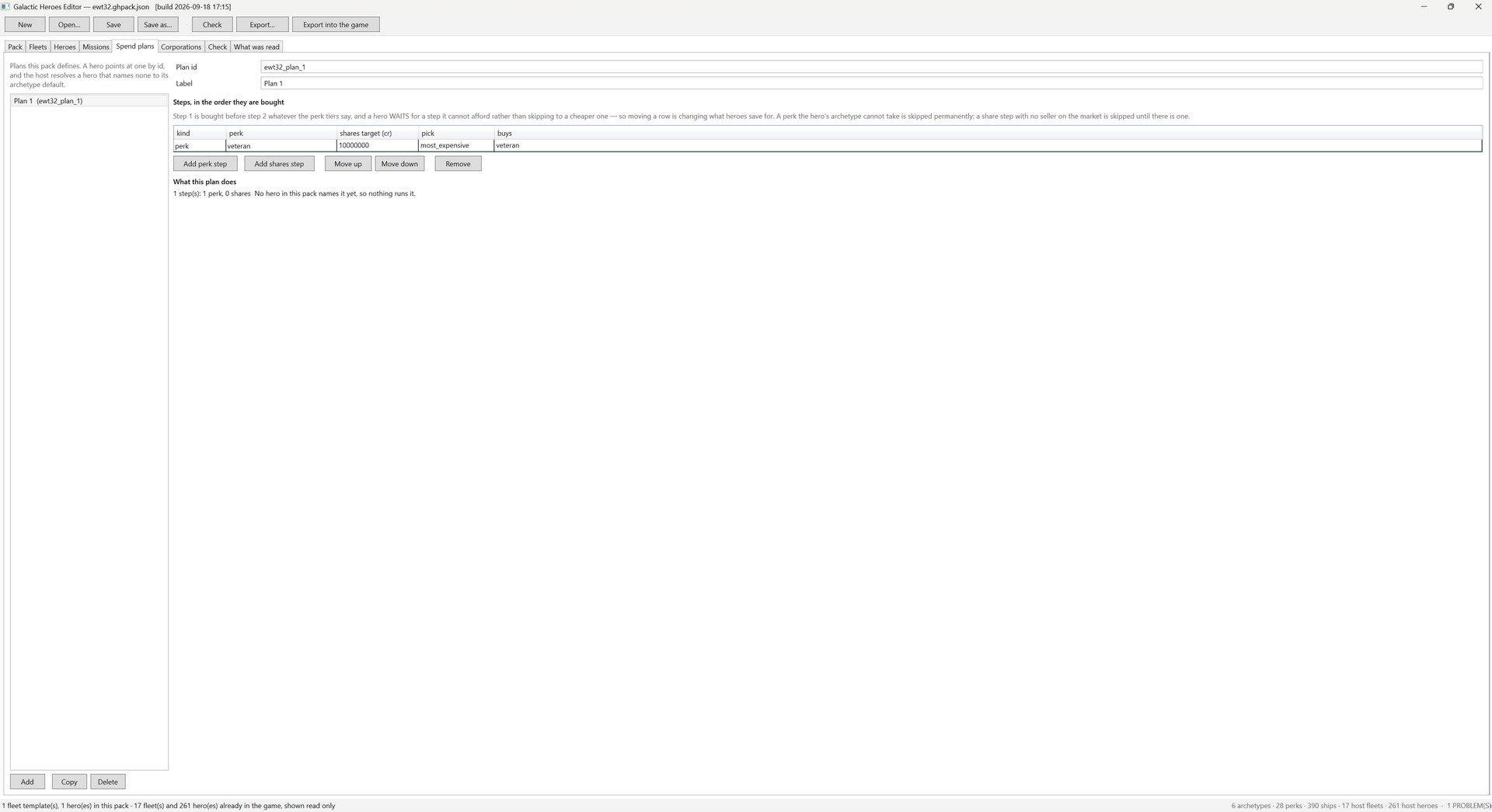
Order is the whole meaning. Step 1 is bought before step 2 whatever the perk tiers say, and a hero that cannot afford a step waits for it rather than skipping to a cheaper one — so moving a row changes what heroes save for. Two kinds of step:
- perk — buy a named perk.
- shares — buy shares until the holding reaches a credit target, with a pick rule such as
most_expensive.
A step that cannot run is skipped rather than blocking the ones below it: a perk the hero’s archetype cannot take is skipped permanently, a share step with no seller on the market is skipped until there is one.
The What this plan does line underneath is the part worth reading. Above it says, correctly, that the plan has one perk step and no share steps, and that no hero in this pack names it yet — so nothing runs it. A plan nobody points at is not an error; it is simply inert.
The other two tabs
Section titled “The other two tabs”A pack can also author corporation missions and corporations, and neither is on this path because neither is needed for a hero to fly. Both are on the reference page: Missions for paid jobs a company offers the player, and Corporations for companies — read that one before you found a company, because it is the only object here that a save keeps forever.
5. Check
Section titled “5. Check”Check tab, or the Check button in the toolbar.
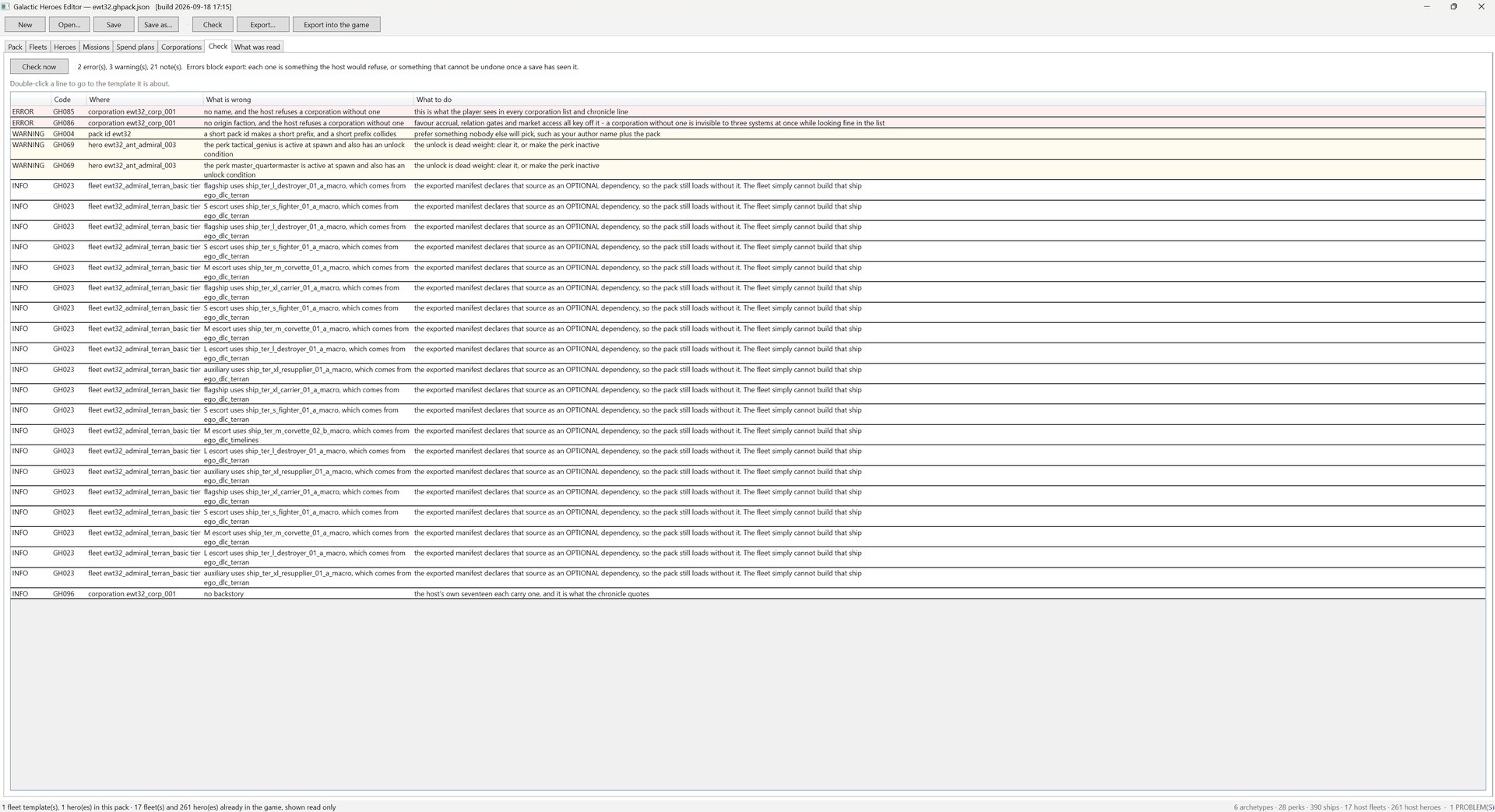
104 rules, in three severities:
| 68 errors | block export. Every one is something the host would refuse at load, or something a save could not recover from. |
| 28 warnings | do not block. The pack will load; the warning says what it will look like in game. |
| 8 notes | information the author could not otherwise have. Most of them are the DLC dependency lines above. |
Every row says what to do about it, and double-clicking a row jumps to the field it is about — the tab, the object, the row inside it, and the box itself.
You will rarely need to come here first, though. The check runs by itself a moment after every edit, and each finding is shown where you are looking: a count on the tab header (Heroes ✖ 2), a mark on the object’s row in the list, a short panel above the form — errors and warnings, five at a time, with the notes counted underneath — and a red or amber outline on the box that sets the field, with the message and the fix as its tool tip. Fix the field and the mark goes. The Check tab is the full list, notes included.
One finding has no rule behind it in the usual sense: text typed into a number box. The founding capital, an escort count, a reward — type abc into one and the editor keeps the last number it had, outlines the box, and refuses to export until the box holds a number again. Without that the old value would have been exported silently.
The shot above is a pack that cannot be exported yet, and it is worth walking. The two red rows are one half-written corporation: no name and no origin faction. Both are errors rather than warnings because the host refuses a company without either, and a company is the one object a save keeps forever — so there is no fixing it later. The three warnings will export fine: a pack id short enough to collide with somebody else’s, and two perks that are switched on at spawn and carry an unlock condition that can therefore never do anything. The twenty-one notes are mostly the DLC ledger — which Terran ship came from which extension, each of which becomes an optional dependency line in the manifest.
The reference explains the three kinds of rule and why checking things the host already checks is not redundant.
6. Export
Section titled “6. Export”Two buttons, and the difference matters.
Export… writes the pack into your export folder — <export folder>/<packid>/ with content.xml, md/<packid>.xml, t/0001.xml and README.txt. Copy that folder into X4 Foundations/extensions/ yourself. This is what you upload.
Export into the game writes the same four files straight into extensions/<packid> in your install. It asks first, it names the exact folder, and it overwrites what is there. The game must be closed.
t/0001.xml is the pack’s text page: your hero’s name and story and your company’s name are on it, numbered, and the script points at them. That is what lets somebody translate your pack without touching the script — the README.txt in the export says how. The first export assigns the numbers and saves them into your pack file, so a translation made from it still lines up with the next export.
Either way the check runs first. If the pack has errors, nothing is written and you land on the Check tab with the count.
7. Confirm it loaded
Section titled “7. Confirm it loaded”Start the game and search debug.log for your pack’s build banner:
EWT32 BUILD ewt32_v1The banner is written as a literal, not assembled at runtime, so finding it proves the file on disk is the one the game is running — not a stale copy in another extensions folder. The same trick is why the host announces MLOG_HEROES BUILD <label> on every load.
After that, your hero is in the pool like any other: it spawns when its faction has a slot, climbs the ladder you wrote, and dies by the same d100 roll as everybody else.
Where things go wrong
Section titled “Where things go wrong”| Symptom | Cause |
|---|---|
| A dropdown is empty | the harvest failed. What was read → Reading names the source and the reason. |
| The hero never appears | its faction has no claimspace tag, so there is no home sector to spawn into — or Spawns is unchecked. |
| The fleet never grows | the archetype has fleet upgrades off. Coordinators and hive lords do; they command differently. See the archetype pages. |
| The banner is not in the log | the game is loading a different copy of the pack, or the extension is disabled in the extensions menu. |
| A number box is outlined red and the row says ✖ | what you typed is not a number. The field still holds its last number, and export waits until the box holds one again. |
| The Pack tab says text page N is already used by … | another installed mod declares that page. Pick another number on the Pack tab — before you export, because a translation names the page. |
Names show as readtext.{…} in game | the pack’s t folder did not reach the game. Copy the whole export folder, not only md. |
| An edit to a corporation did nothing | founding capital is read once, at founding. The rest of that story is on the reference page. |