DA Gate
Player control over the game’s dormant jump gates. Vanilla X4 has a set of gate connections that stay inactive until a specific story mission unlocks them. DA Gate hijacks that — every tracked gate pair is exposed as a clickable toggle. You can activate or deactivate any of them at any moment.
In-game view
Section titled “In-game view”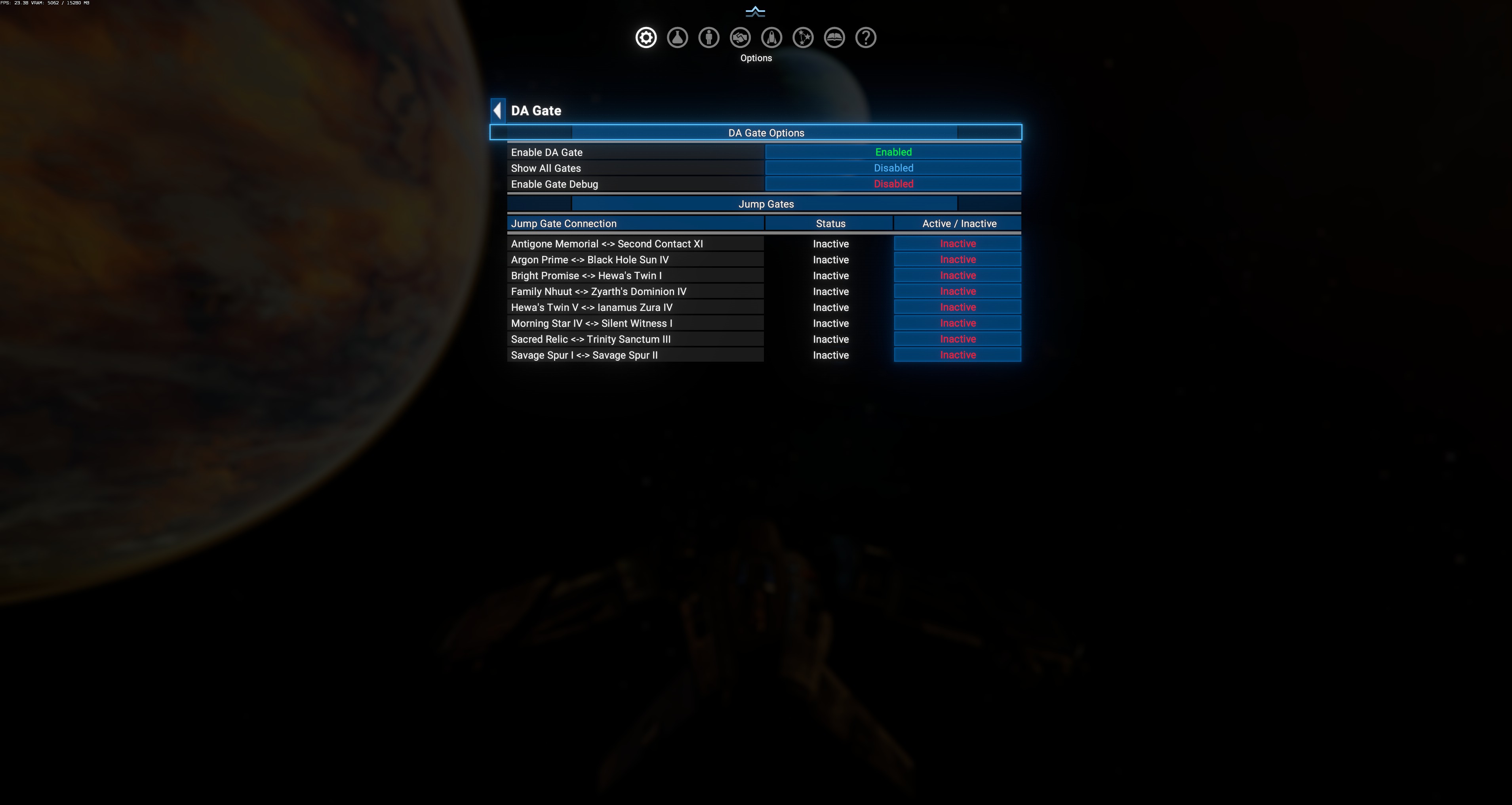
Layout:
- Top section (
DA Gate Options) — 3 configurable fields. - Bottom section (
Jump Gates) — read-only table of currently-tracked gate pairs. Each row has a click-to-toggle button.
DA Gate Options
Section titled “DA Gate Options”| Setting | Default | Effect |
|---|---|---|
| Enable DA Gate | Enabled | Master toggle for the whole subsystem. When on, DA scans for tracked gate zones on gamestart and rebuilds the table. Off = no runtime tracking, existing gate states left untouched. $DAGateEnable in source. |
| Show All Gates | Disabled | When off (default), only DA’s hardcoded dormant-gate whitelist is shown (see Tracked zones below — 8-12 gates depending on installed DLCs). When on, the table expands to include every gate in the galaxy, including all currently-active ones. Use with caution — activating already-active gates is a no-op, but the table becomes very long. $DAGateShowAllGates. |
| Enable Gate Debug | Disabled | Verbose [GATE] log lines with per-gate scan-result diagnostics. $DAGateDetailedDebug. |
Jump Gates table
Section titled “Jump Gates table”Three-column table listing every tracked gate pair, sorted alphabetically by sector name.
| Column | Meaning |
|---|---|
| Jump Gate Connection | Sector A <-> Sector B — the two endpoints of the gate pair. |
| Status | Read-only current game state. Active (green) or Inactive (red). Reflects vanilla gate.isactive — automatically updates when the state changes. |
| Active / Inactive | Click-to-toggle button. Clicking flips both gates in the pair (entry gate + exit gate) between active and inactive states. Fires ExecuteOption_GateTriggerGate. |
Interaction model: Status shows the current engine state; Active/Inactive is the player-set target that also happens to reflect the same state (they’re always identical because the toggle applies immediately). Two columns exist because the code path can imagine future disagreement between “requested” and “current” states.
Tracked zones
Section titled “Tracked zones”DA has a hardcoded whitelist of dormant-gate zone macros (md/deadairdynamicuniverse.xml:215-226):
Vanilla base game (always tracked)
Section titled “Vanilla base game (always tracked)”| Zone macro | What it enables |
|---|---|
ZoneDAG3_Cluster_28_Sector001_macro | One of the vanilla dormant gate pair endpoints. |
ZoneDAG6_Cluster_41_Sector001_macro | Another dormant gate pair endpoint. |
Terran DLC (Cradle of Humanity)
Section titled “Terran DLC (Cradle of Humanity)”| Zone macro | What it enables |
|---|---|
ZoneDAG5_Cluster_405_Sector001_macro | Terran-side dormant gate. |
ZoneDAG2_Cluster_418_Sector001_macro | Terran-side dormant gate. |
Boron DLC (Kingdom End)
Section titled “Boron DLC (Kingdom End)”| Zone macro | What it enables |
|---|---|
ZoneDAG1_Cluster_112_Sector001_macro | Boron-side dormant gate. |
ZoneDAG1_Cluster_112_Sector002_macro | Boron-side dormant gate. |
The 8 gate connections seen in a full-DLC save (from the observed screenshot):
- Antigone Memorial ↔ Second Contact XI
- Argon Prime ↔ Black Hole Sun IV
- Bright Promise ↔ Hewa’s Twin I
- Family Nhuut ↔ Zyarth’s Dominion IV
- Hewa’s Twin V ↔ Ianamus Zura IV
- Morning Star IV ↔ Silent Witness I
- Sacred Relic ↔ Trinity Sanctum III
- Savage Spur I ↔ Savage Spur II
The exact list depends on installed DLCs — the code uses haslicence-style DLC guards to skip macros that aren’t loaded, avoiding “unknown macro” errors.
Interaction with modded gates
Section titled “Interaction with modded gates”DA Gate exposes an event hook (EventGateFindOtherModGates) that other mods can signal with a list of zone macros to register their own dormant gates for tracking. See md/deadairdynamicuniverse.xml:9318 — signature: event.param = [$ZoneMacros].
Any signaled zone gets added to $DAGateTrackedGates and appears in the menu identically to vanilla gates. This is how compat mods (Apus, ETW) can slot their custom dormant gates into DA’s UI without patching DA itself.
Use cases
Section titled “Use cases”- Skip early exploration: activate
Show All Gatesand toggle every gate on to open the entire map at gamestart. Useful for testing / role-play / sandbox saves. - Story-gate control: activate a specific dormant pair (e.g. Terran ↔ Argon) without triggering the vanilla story mission that normally unlocks it.
- Faction isolation experiments: turn OFF a normally-active gate to see how the AI economy handles a severed sector. DA Fill and SST should re-route around it.
- Roleplay: flip a gate back off after a decisive fleet action (“we’ve closed the Xenon front”).
Preset scope
Section titled “Preset scope”Only the 3 top-level options (Enable DA Gate, Show All Gates, Enable Gate Debug) are in Configuration Presets scope. The per-gate Active/Inactive state is NOT — presets don’t toggle individual gates for you.
- Save-compat: enabling a gate that was originally inactive is a live change to
gate.isactive. It should persist across save/load without issues, but there’s no explicit rollback if you disable the mod later. Test in a throwaway save first. - Story missions: if a vanilla story mission expects to open a specific gate later, and you already toggled it on manually, the mission may complete its “open gate” step as a no-op. It doesn’t break the mission, but the gate-opening cinematic won’t fire.
- Xenon incursion risk: opening a normally-closed gate near a Xenon-adjacent sector can trigger a large Xenon wave through the new connection. Fun but destabilizing.