God Quotas
Per-faction, per-ware quota table showing exactly what modules DA God plans to add across the galaxy when the Shortcut button is pressed. This is a read-only view — the actual numbers are calculated at gamestart from your Economy sizing and Configuration Preset choice; the menu displays them so you can preview the bootstrap operation before triggering it.
In-game view
Section titled “In-game view”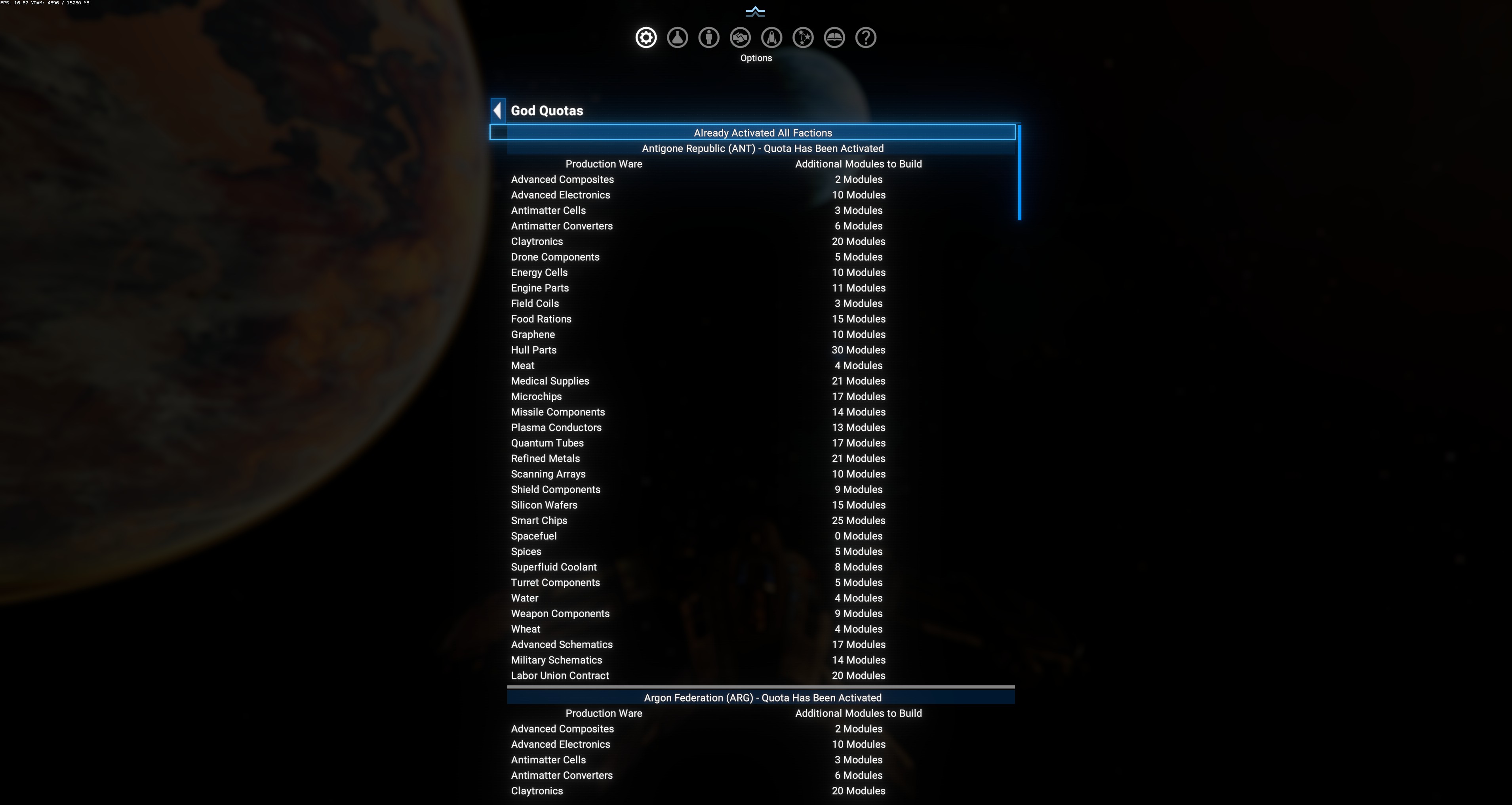
The menu is a vertical list of factions, each acting as its own visual sub-section. Above the first faction there’s a duplicate of the parent-menu Shortcut button (typically Already Activated All Factions after first trigger). Each faction shows:
- A title bar:
<Faction Name> (<CODE>) - Quota Has Been Activatedor- Quota Pending. - A 2-column table: Production Ware | Additional Modules to Build.
Columns
Section titled “Columns”| Column | Meaning |
|---|---|
| Production Ware | Vanilla ware name (Advanced Composites, Antimatter Cells, Claytronics, etc.). Any ware DA has classified as a valid production input/output at some faction module. |
| Additional Modules to Build | Integer count — how many more production modules of this ware DA thinks the faction should have. 0 Modules = no additional needed; higher = the faction is under-supplied in that ware. |
Source of the numbers
Section titled “Source of the numbers”$DAGodFactionModuleQuotas.{faction}.{ware}.{2} — the second element of the per-ware tuple (md/deadairdynamicuniverse.xml:9697). The tuple format is [Module_Macro_Reference, Additional_Modules_Count, ...]. Element 1 is the module macro to build, element 2 is the count.
Numbers are computed at gamestart by walking every faction’s current production capacity vs their consumption needs. The exact calculation lives in the ECO analysis pipeline that runs shortly after SetupComplete.
Observed values from the sample save
Section titled “Observed values from the sample save”Antigone Republic (ANT) - Quota Has Been Activated:
| Production Ware | Additional Modules |
|---|---|
| Advanced Composites | 2 |
| Advanced Electronics | 10 |
| Antimatter Cells | 3 |
| Antimatter Converters | 6 |
| Claytronics | 20 |
| Drone Components | 5 |
| Energy Cells | 10 |
| Engine Parts | 11 |
| Field Coils | 3 |
| Food Rations | 15 |
| Graphene | 10 |
| Hull Parts | 30 |
| Meat | 4 |
| Medical Supplies | 21 |
| Microchips | 17 |
| Missile Components | 14 |
| Plasma Conductors | 13 |
| Quantum Tubes | 17 |
| Refined Metals | 21 |
| Scanning Arrays | 10 |
| Shield Components | 9 |
| Silicon Wafers | 15 |
| Smart Chips | 25 |
| Spacefuel | 0 |
| Spices | 5 |
| Superfluid Coolant | 8 |
| Turret Components | 5 |
| Water | 4 |
| Weapon Components | 9 |
| Wheat | 4 |
| Advanced Schematics | 17 |
| Military Schematics | 14 |
| Labor Union Contract | 20 |
Total: 33 wares tracked. Sum of Additional Modules ≈ 371. This is what one Shortcut press would have queued for Antigone alone.
Read: the largest counts are for high-demand intermediate wares (Hull Parts 30, Smart Chips 25, Refined Metals 21, Medical Supplies 21) — these are the bottlenecks Antigone currently faces. Claytronics 20 and Advanced Electronics 10 are luxury / high-tech chains DA thinks need more coverage. Spacefuel 0 means Antigone already produces enough (it’s a lawful faction, low Spacefuel demand).
Below Antigone comes Argon Federation (ARG), then the rest — the menu scrolls through every enumerated faction. Same 33-ware shape per faction (numbers vary).
Interpretation
Section titled “Interpretation”- A large row (20+ modules): faction is severely under-supplied. Pressing Shortcut will queue major expansion in that ware.
- A zero row: faction already produces enough — no action queued.
Quota Has Been Activated: the Shortcut button has been pressed for this faction; DA’s request pipeline is now processing the pending modules over time.Quota Pending: the Shortcut button has not yet been pressed for this faction; the numbers are ready but the pipeline hasn’t started.
What ties into the Station Max Module Setting
Section titled “What ties into the Station Max Module Setting”The additional-modules numbers here are per-ware and cumulative across the faction. But each individual station has a hard ceiling of Station Max Module Setting (default 40). So DA distributes the queued modules across multiple existing stations rather than piling them all onto one megastation.
Example: if the quota says “Antigone needs +30 Hull Parts modules”, and Station Max Module Setting is 40, DA will:
- Check each Antigone shipyard/wharf/factory currently building Hull Parts.
- For each station with current-count < 40, add Hull Parts modules until the station hits 40.
- Move to the next station if the quota isn’t yet exhausted.
- If quota still isn’t met after all existing stations are maxed, request a new station via the vanilla God pipeline.
Interaction with the known 9.0 staged-construction issue
Section titled “Interaction with the known 9.0 staged-construction issue”Because ~100% of 9.0 stations report hasstagedconstruction = true, most of the queued module adds hit the “staged-with-no-future-stage” skip path and never actually apply. The quotas display continues to show the pending numbers — but the actual builds may not happen. This is why the observed save shows “Quota Has Been Activated” (button was pressed) but the galaxy’s total station count may not have visibly grown proportional to the numbers.
The eventual fix (migrate to <add_build_to_expand_station>) will change nothing in this UI — the same numbers will display, but they’ll actually resolve into station module adds.
When to check
Section titled “When to check”- After choosing a Preset: the Aggressive preset produces larger per-ware counts than Peaceful. Check here to see the delta.
- Before pressing the Shortcut button: review what you’re about to trigger.
- After a save-migration or mod add: if you added a compat mod that registers new factions, check that they appear here with reasonable numbers.