Station Storage
Per-faction ware storage view. Same ware list as Ware Stored/Wanted but the columns are different: instead of one Stored/Wanted percentage, this page shows Producer and Consumer storage capacity per ware — which stations in the faction network are set up to hold this ware.
In-game view
Section titled “In-game view”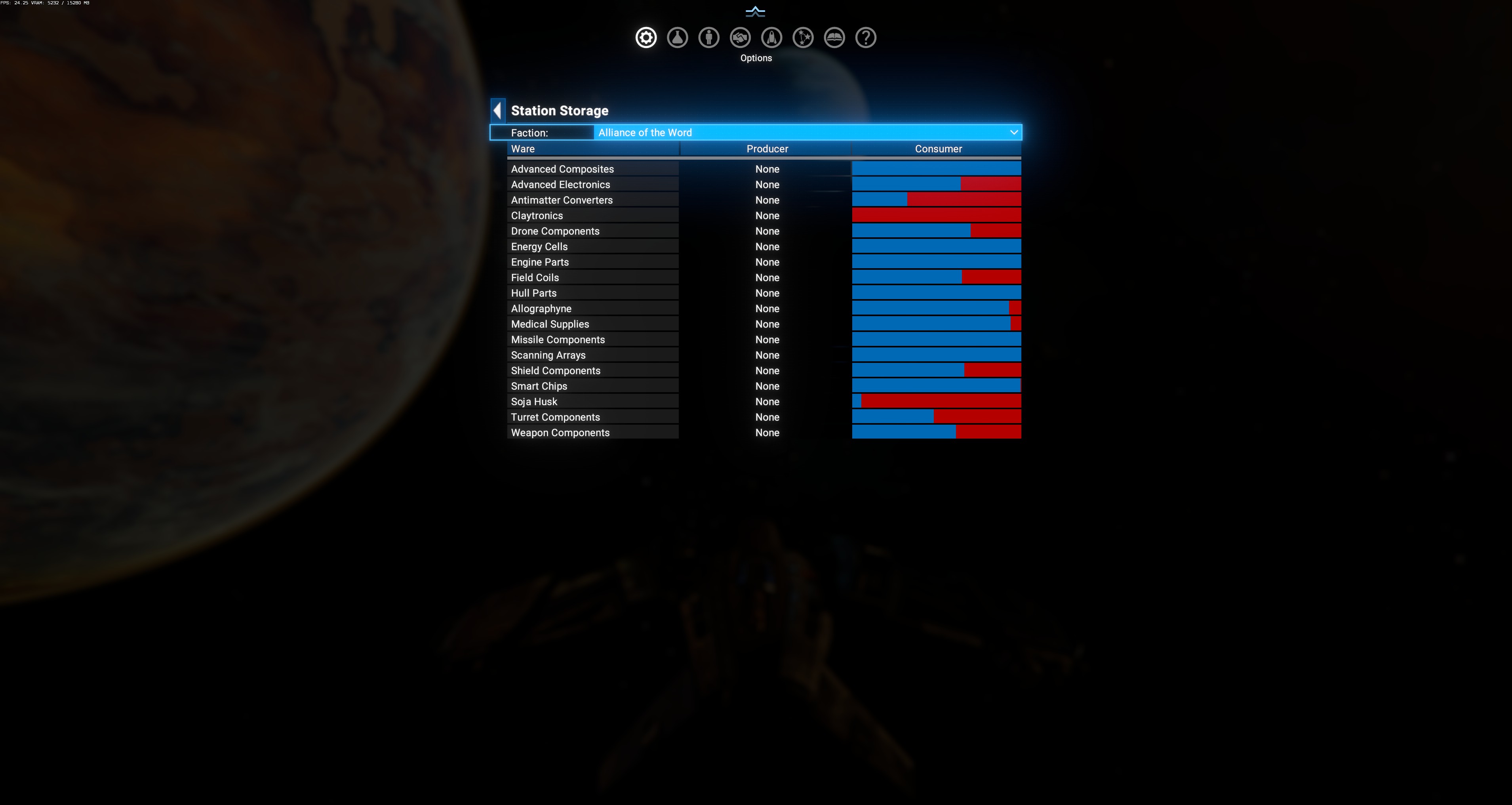
Filter row
Section titled “Filter row”Faction dropdown at the top — same faction picker as Ware Stored/Wanted.
Columns
Section titled “Columns”| Column | Meaning |
|---|---|
| Ware | Localized ware name. |
| Producer | Total storage capacity across faction stations that produce this ware (are the source of it). |
| Consumer | Total storage capacity across faction stations that consume this ware (need it as input). |
| Bar (right side) | Visual: same color coding as Ware Stored/Wanted — blue portion = current stored, red tail = shortage against needed. |
Observed values (Alliance of the Word selected)
Section titled “Observed values (Alliance of the Word selected)”Every row shows None / None in the Producer/Consumer columns. This means Alliance of the Word has no station modules that produce or consume any tracked ware.
The bars still show the current supply state (bringing in the same data as Ware Stored/Wanted):
- Advanced Composites — full blue (all stored)
- Advanced Electronics — mostly blue, small red tail
- Antimatter Converters — half red
- Claytronics — full red (0% stored)
- … etc.
Read: Alliance of the Word has stations but they’re all trade / storage stations, not production/consumption modules. Their wares are stored by third parties (via trade) rather than manufactured. The None / None result means DA can’t attribute production/consumption capacity to their infrastructure.
Why “None” for a small faction
Section titled “Why “None” for a small faction”A faction shows None / None for a ware when:
- It has no production module built for that ware (no manufacturing station registered to produce it).
- It has no consumer module either (no downstream station registered to consume it).
- Yet the ware is on the tracking list — usually because the faction has trade-station capacity or is otherwise flagged as caring about it.
For a real production faction
Section titled “For a real production faction”Pick Terran Protectorate or Godrealm of the Paranid from the dropdown — you’ll see:
- Producer columns showing capacity numbers (e.g.
50000= 50k units) — sum of storage on all Terran production modules that output the ware. - Consumer columns showing capacity numbers — sum of storage on downstream Terran factories that need it.
For example, a healthy Terran economy shows:
- Terran MRE: Producer 200k / Consumer 40k (Terran produces a lot of MRE)
- Antimatter Cells: Producer 0 / Consumer 80k (Terran uses AC as input, not produced by them)
- Advanced Composites: Producer 60k / Consumer 30k (produced and consumed both)
Both pages read the same underlying data, but frame it differently:
- Ware Stored/Wanted = “how much is currently in storage vs. what I want” (percentage view).
- Station Storage = “which of my stations produce/consume this ware, and how much capacity do they have” (infrastructure view).
Use them together:
- Red bars in Ware Stored/Wanted + Producer=None in Station Storage → the faction needs the ware but has no production infrastructure. Must import.
- Red bars in Ware Stored/Wanted + Producer=high → the faction has production but the production is broken (upstream inputs unavailable, or module offline).
Use cases
Section titled “Use cases”- Diagnose broken supply chain: if a faction should be producing X but the Producer column reads 0 or None, their manufacturing infrastructure is missing or misregistered.
- Plan trade routes: find factions with Producer=high for a ware you can move to a Consumer=high faction elsewhere.
- Detect module conversion issues: if you notice a faction went from Producer=high to Producer=0 between menu opens, something destroyed or converted their production modules.
- Snapshot at menu-open — reopen to refresh.
- Sum across all stations — DA aggregates by ware, not by individual station. Use Sector Details Menu for per-sector visibility.
- Wares outside the tracking set don’t appear — this menu shows only the wares DA considers relevant to that faction.